
If you’re a sociable soul and enjoy sharing your knowledge in person, then the closest thing to doing that in the online world is through the power of webinars or teleseminars. I personally think there is nothing more valuable then hearing direct from you on your product or service, or an expert that you want to introduce to your audience.
I can’t tell you how many webinars and teleseminars I’ve attended since starting my business to learn about various topics that would help me personally of professionally. I view it as investing an hour or more each week into my bank of knowledge.
If I can find out all I want to know (for now) in a call or webinar, as opposed to researching it myself or reading several books, then I’m sold.
I’ve held a number of webinars myself and each time I’ve continued to get a growing audience of people who know that I always aim to deliver value – whether it’s me talking on a topic I love or bringing in an expert. I love the feedback I get too and it drives me to do more everytime.
I go into much more depth about using these tools to grow your online business, attract leads and convert them in my BYOB Build Your Online Business guide.
What are webinars perfect for?
Webinars help you share your expertise in an educational and entertaining way and adding massive value to your attendees for free. At the very least it makes you memorable. At the other end of the spectrum you leave them with a reason to trust you and buy from you, either now or in the future.
The key to holding a great webinar?
Be passionate about what you deliver. Offer amazing content and useful information. Create value. Have the product ready to sell.
I encourage you to start thinking about what you could talk about for an hour that would help your customers or clients out. Think about what you already know that others would be keen to learn. Sometimes you can surprise yourself. Don’t overlook your hard earned-knowledge and skillset. If you can break that down into a series of step by step processes that will help others to do the same then snap to it.
Let’s get down to the step you can take to host a really top-notch webinar.
What to do before and during a webinar
A webinar can take quite a lot of planning but as you do more of them you definitely get a system in place. If you’re running it yourself put aside at least 3-4 hours to put your slides together the first time. Double check them, the timing, the images, the spelling and do your own run through to ensure you’ve got the pacing right.
During your presentation use lots of images, less text. Think about what keeps you entertained during an hour (similar to what would keep you entertained in any presentation, TV series or film). You can have from 50-100 slides if you’re using mainly images to drive emotion and showcase empathy.
- Keep them entertained from the minute they come to the very end til after the webinar ends with a lively tone, fun and friendly style and a good pace that keeps attendees focused
- Make sure every slide leads on to the next and tells a story. Wow them with images
- Send out an email 1 hour before to tell them to join the webinar early to get their spot. You can choose to limit your spots available especially if it’s a one-time live event
- Make sure that you, as the webinar organizer get on the call early, at least 30 minutes before to test the platform and if you’re co-presenting to show them the webinar platform
- People start joining around 15 minutes before so you need to start engaging with them early, tell them you’re starting soon, to get their pens and paper out to take notes
- Continue to make announcement in the countdown to the webinar starting and welcoming people to keep them engaged
- Tell your attendees there will be time for question during the webinar and check in at the first 15-20 minutes and at the 40 minute mark to answer questions and be helpful
- Tell them to stay on until the end as there will be a special giveaway, discount or download then depending on the nature of your webinar
- After the webinar make sure you follow up with an email recapping the key points, include a few testimonials you have from Twitter or email and a link to the recording.
Which platforms are best to use for hosting your webinar?
I’d recommend two platforms.
GoToWebinar
With GoToWebinar, you can give presentations, run great webinars, perform product demonstrations to up to 1,000
attendees, anytime, anywhere — all for one flat fee.
The main key features that differentiate it above other services out there are:
- Automated Email Templates: Using your Webinar description, GoToWebinar will craft your email invitations, confirmations and reminders for you; or you can customize them.
- Customized Branding: Upload your company logo and a custom image to show your brand on all Webinar materials.
- Full-Service Registration: GoToWebinar will host your registration page and send you weekly registration reports.
- Unlimited Audio: You can use included VoIP and toll-based phone options to reduce audio costs.
This last one is probably my favorite feature, that people can turn up and ask questions or comment or call in without needing to dial in and just using their laptop speaker and mic.
MeetingBurner
MeetingBurner really cater to the entrepreneur with their straight forward, clean and easy to use interface, which you can see demonstrated on their home page.
I’ve used their platform for several group coaching calls and webinars and love the clean interface, easy to use layout and fact that their loading time is beyond quick and there’s no software to install.
I also like that:
- You can duplicate your webinar if you want to run it again, or a similar one
- You can charge for your webinar if you want it to be a paid training, through MeetingBurner’s integration with PayPal at the registration page
- They integrate social media sharing so people can sign up through Facebook and;
- MeetingBurner have the functionality to auto-replay your webinar at a later date.
How to market your webinar successfully
Thanks to Lewis Howes, a master of webinars who’s built a 7 figure business out of it, I took notes of his 4 day marketing promotion plan for your webinar. If you can do all these steps you’ll be off to a rip-roaring start:
Hold it on a Tuesday or Thursday at noon or 9pm EST- either lunch or after dinner. If you have an international audience like mine you can experiment with afternoons and morning times.
Day 1: Sunday or Monday send an email to your list of why they need to sign up for your fab webinar. Send it to the unopened emails 8 hours later with a different compelling headline.
Day 2: All about social media. Post it out to your LinkedIn Groups, Twitter, Create a Facebook event. Use the share buttons from the registration page.
Day 3: Come back to the email – target the whole list again with a different message, shorter, a few different points, one sign up link and the download/ free access offer – only if they attend live.
Day 4: Send it again to the unopened again – different header. Do more social media promoting.
Send another email to those who are signed up saying `Are you joining us for lunch?’ `You’re going to join us right? We’re starting in 10 minutes’.
Quick note I don’t tend to do all this but I do make sure I continue to promote it on social media if I don’t include the email steps as you need at least 7-8 touch points to reach people.
More tips on hosting a great webinar
The before tips: As I said there’s a lot of planning that goes into a webinar. In addition to creating your killer presentation you need to consider what call to action you want from your attendees who get 1 hour’s worth of value from you for free. You can point to a special offer on a product or promotion or get them to opt-in to your list, or work with you in some other way that’s relevant to your business.
You need to test the landing page for this as well and any discount code and make it as simple as possible for them to take action.
During the webinar: It helps to have another person on board to help you out should you have any technical difficulties if you’re doing it by yourself. If possible they can keep an eye on the questions and feed them back to you or answer any by instant messenger. Most webinars have a panel where attendees can type in questions and you can monitor and answer them. You can also offer to unmute people with a question and get them to talk live on the webinar if you wish to. Whatever you feel comfortable with.
If you’re hosting it with someone else choose one to answer the questions and one to do the talking and keep the momentum going. Where possible use a back up recording option like Camtasia just in case as you don’t want to do all the hardwork only to not record it and have it available for those that didn’t show up.
Post webinar: After the webinar you will naturally want to email all the attendees with the summary of the webinar, a few brief points and a link to the recording as well as a direct link to our offer or that of the person you brought in on the webinar.
Then you should follow up with another email a day or two before the offer ends and before the recording will be taken down – you should have a time limit on how long they can access it because people are inherently lazy and will not take the time to watch it if there’s no pressure too (I know because I often forget too until I get a reminder email!).
How to Host A Teleseminar
Much like webinars, teleseminars are another option to showcase your knowledge to an engaged audience over the phone. Plus, a live teleseminar is more human, intimate, and interactive than a website, which gives you the chance to build trust. And all else being equal, people buy from people they trust.
I will hold my hand up here and say that I have not yet run a Teleseminar but I have been interviewed for several. I’ve attended quite a few too, and like webinars, as an attendee you can choose whether to just benefit from the free information or go one step further and purchase what’s on offer.
What I enjoy about them is because you’re just listening you really can focus in on what’s being said. I listen to the recordings again on my iPhone when I’m out running and soak up all the information.
Telseminar series can be a one off call or, as I’m seeing more of, a week-long event packed with valuable calls with experts, sometimes up to 3 calls per day. They are a great deal of work to put together but the benefits can be huge.
For example the recent Women on Purpose Entrepreneurial Telesummit grew Sage Lavine’s mailing list by over 3800 women in 37 countries and generated over $25,000 in sales in less than 2 months & $15,000 in follow up sales!
So I have to say offering teleseminars as a part of your services could be a great choice for you. Knowing which type is the best for you is where it can get challenging because there are dozens of “types” of teleseminars to choose from. Here are three popular types:
Preview Calls
According to those in the know, when you’re new to teleseminars a Preview Call is a great type to start out with and they’re really popular. It’s basically just what it sounds like. So invite people to hear you talk about your subject matter for around an hour and give them a taste of what a paid course with you will be all about. The success of this is all about being able to market it and sell during the call and after in your follow up emails.
FAQ Call
An FAQ call is where you provide the most commonly requested information to your customers or audience. If you have people asking the same questions over and over about your products or services you could prerecord a session. This is handy to give you to new clients when they come on board so they can get a copy of the recording which is helpful and saves you time. For example if you have a specific program that is quite complex and involves a lot of information you can give this recording to them when they’ve bought the program, as an instant download of the most common questions they may have.
Expert Interview
I’ll give you two guesses what his involves…..pretty self-explanatory here. You go and interview experts to glean their knowledge as you know it will bring incredible amount of value to your customers or market. You have to be prepared in advance for this with questions you want to ask them during the interview and how you want to prep the interviewees. Know what you will say, why you are asking this particular expert and what the benefit to the expert is for joining in with you.
Setting Up Your Teleseminar Web Page
Like a webinar you need people to register to attend your teleseminar and that should be the single focus of your sign up page. Start with a great headline and compelling copy on why they should attend. Make sure that the opt-in box is above the fold so people see it straight off when they land on your page.
Your opt-in should be linked to an email client and have an autoresponder set up so that when your potential future customer enters their email address they will receive a series of follow up emails related to the teleseminar telling them when it’s happening and what they need to do to attend. Want further information on that then read Why the Money Really Is In the Email List.
What platform should you use?
This depends on whether you want to pay for the call or have your callers pay. The costs of providing an 800# is .05-.10 per minute per person if you find an economical service. This doesn’t sound like a great deal of money but if you have thousands turn out (which would obviously rock) this could cost you a couple of hundred dollars.
This is a small price to pay if you have tested your pricing and know that you will get a great turnout and conversion of buyers that will bring you enough revenue to cover the cost of all your efforts and then some.
If you’re just starting out then you can go the route of providing a line to call into and make sure that the information you provide on the call is valuable enough to your audience that they are willing to pay a couple of dollars to listen in.
So you can choose from
No Cost Conference
Pretty much the same as above, this is a teleconferencing company that provides you with instant, unlimited, automated and free conferencing calls that take place on regular telephone lines – so no computer or internet access required. These conference call services are available 24/7 with no scheduling and an 800 number is available for you as well.
**Instant Teleseminar **This is a full service platform that hosts your entire teleseminar and allows you to build out customized registration and login pages. I like this option because people can call in via Skype for free or listen in online without having pay for any call costs or have a phone. They have a 21 day free trial and then prices start from $47 per month up – so yes the cost is on you. The chances are your registration rates are optimized through using them just because of the professional look and feel of their services.
Example of a successful teleseminar
One of the most useful and successful telseminar `summits’ I recently attended was by Christine Kloser with the Transformational Author experience. I found it incredibly valuable because I’m in the process of writing my book and she had pulled together a week’s worth of interviews with experts in helping you get your book out of your head and into the hands of readers.
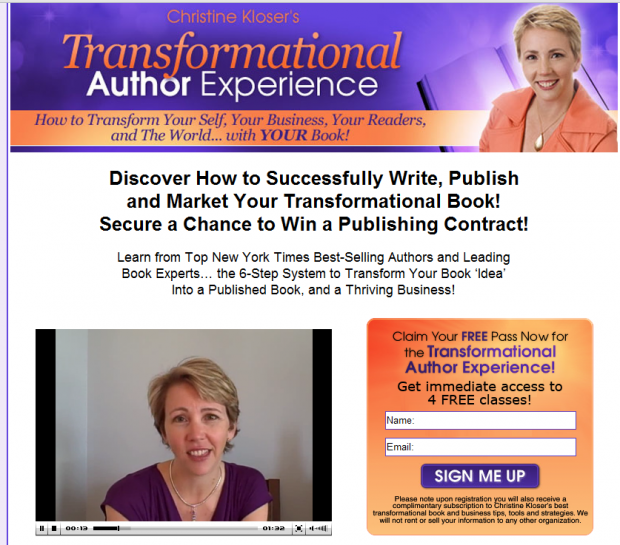
So for starters I was her niche market. How she ran it was you opted in to get access to all the recordings which were free to listen to for a very limited time. If you wanted permanent access them you could buy one of two tiers to get all the recordings for free and enter a competition to win a publishing contract and book coaching. Price points were $97 and $197 which was really reasonable for all the expertise.
On one of her calls she mentioned that in just 3 weeks of spearheading the teleseminar summit she had 200 affiliates come on board to spread her message because of what she was offering – even more powerful.
I’d recommend you think about using webinars or telseminars as a highly valuable option in your online business for driving more leads and potential customers to get to know you, what you offer and to build your trust and credibility and a more personal relationship.
I’d love to hear your comments below and any further advice you can add to the party.